URL to PDF API: send a link, get an A4 PDF.
Screenshotly opens your page in Chromium, applies your print stylesheet and returns a paginated PDF with selectable text and working links. Use it for invoices, reports and exports your app already renders as HTML.
PDF from Basic · fixed A4, 1 cm margins · failed captures cost 0
curl --request POST \
  https://screenshotly.app/api/screenshot \
  --header "x-api-key: $SCREENSHOTLY_API_KEY" \
  --header "content-type: application/json" \
  --data '{
    "url": "https://app.example.com/invoices/inv_8f2c/print",
    "format": "pdf",
    "fullPage": true,
    "waitForNetworkIdle": true
  }' \
--fail --output invoice.pdfHTTP/1.1 200 OK
Content-Type: application/pdf
Content-Disposition: attachment; filename="screenshot-….pdf"
X-Screenshot-Duration: …
X-Screenshot-Size: …Output contract
What every PDF request returns
The PDF settings are fixed in the renderer, so the same URL produces the same layout every time. The trade-off: there are no paper-size or orientation fields.
| Input | A public http(s) URL, up to 2,048 characters | Private networks are rejected. No raw HTML input: host the document on a route you control. |
|---|---|---|
| Output | application/pdf | Text stays selectable and searchable; links stay clickable. |
| Paper | A4 (210 × 297 mm) | Fixed. Letter, Legal and custom sizes are not available. |
| Margins | 1 cm on every side | No API field. In our Chromium tests, an @page margin rule in your CSS took precedence. |
| Styles | Print media, backgrounds on | Your @media print rules apply, and background colors and images are printed. |
| Pages | As many as the document needs | Control page breaks with CSS: break-before, break-inside, <thead> repetition. |
| Delivery | Binary, signed link, async job or webhook | Signed links, jobs and webhooks are on Basic and above; batch submit is Growth and above. |
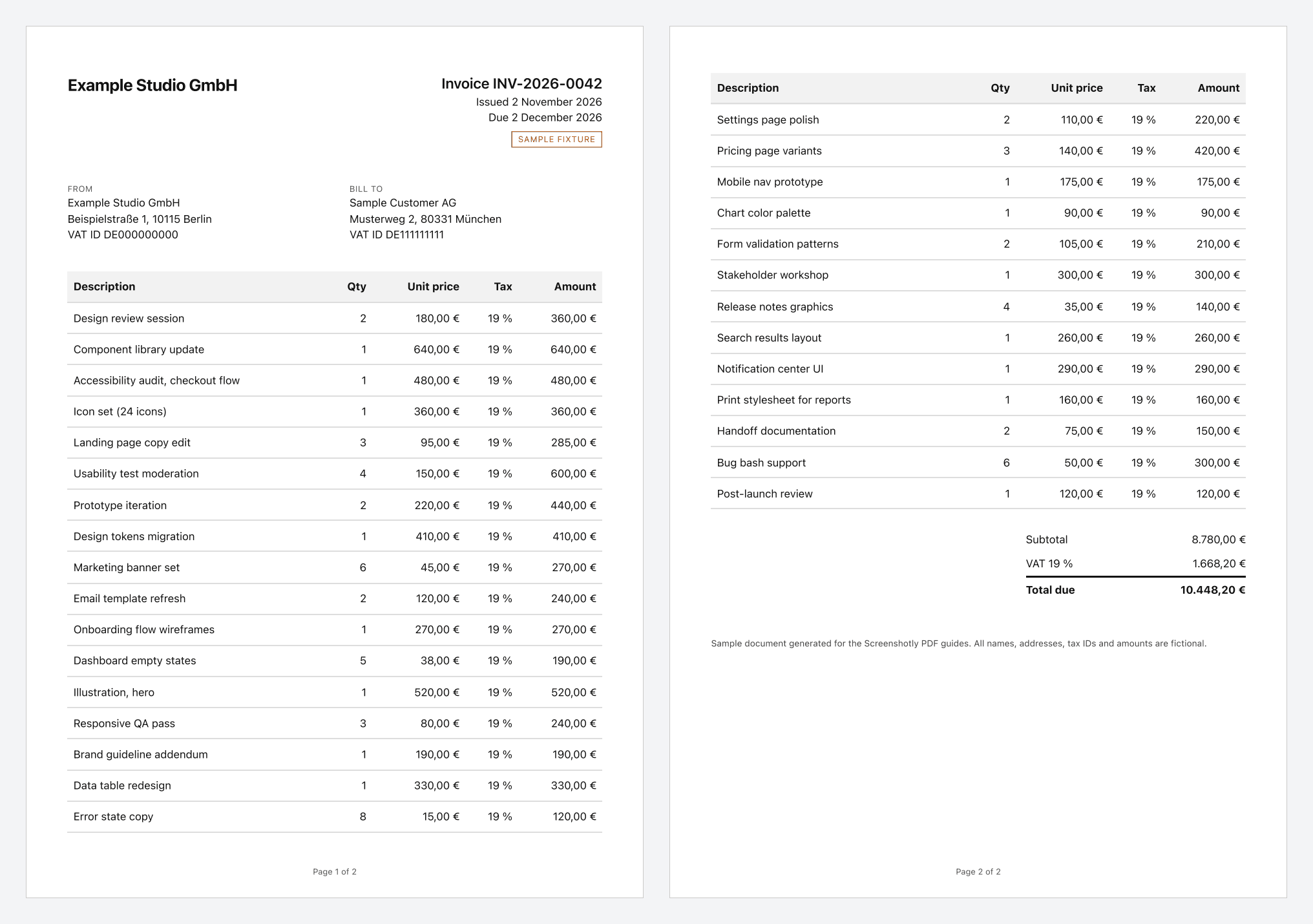
Sample output
A two-page invoice, printed with these settings
How it works
A real browser prints your page
1. Load
Chromium opens your URL with the viewport, cookies and headers you send. Add waitForNetworkIdle, waitForSelector or delay for pages that load data late.
2. Print
The page is printed with print CSS to A4 with 1 cm margins and background graphics, across as many pages as it needs.
3. Deliver
The PDF bytes come back in the response. You can also ask for a signed storage link, queue an async job, or receive a signed webhook.
Use cases
Built for documents your app already renders
Invoices and receipts
Print the invoice page your app already renders, behind a short-lived token, and store the exact file you send.
Invoice PDF guide →Scheduled reports
Queue month-end statements or weekly reports as async jobs with idempotency keys, then email the stored files.
Batch and email guide →Dashboards and exports
Give users a "Download PDF" button that prints a dedicated print route instead of maintaining a second PDF layout.
PDF API guide →Page records
Keep a paginated, text-searchable copy of a public page alongside the screenshots you already capture.
Archival guide →Rendering behavior
What Chromium does to your page when it prints
We rendered test pages with Screenshotly’s exact PDF settings and inspected the output. Print behavior can vary between Chromium versions, so check a capture of your own document.
- Breakpoints follow the paper
- The printable width is 190 mm, about 718 CSS px. A min-width: 900px media query is false in the PDF even with a 1920 px viewport.
- Fixed elements repeat
- position: fixed headers and chat widgets print on every page. Hide them in @media print.
- Table headers repeat
- A real <thead> is repeated at the top of each page a long table spans.
- Page numbers come from CSS
- The API adds no header or footer. @page margin boxes such as @bottom-center with counter(page) printed in our tests.
- Web fonts need fullPage
- Font downloads are skipped unless the request sends fullPage: true. Otherwise the next font in your stack is used.
- @page size is ignored
- Named and custom @page sizes do not change the A4 paper. In our test the landscape keyword still produced A4 landscape.
Tested CSS for each of these is in the CSS print styling guide →
Plans
PDF output starts on Basic
Every paid plan includes PDF output. Plans differ in monthly volume, request rate and the controls that apply to the page before printing.
| Plan | Price | Captures | Rate |
|---|---|---|---|
| Basic | $14/mo | 2,500 captures / month | 40 requests / minute |
| Growth | $59/mo | 12,000 captures / month | 80 requests / minute |
| Scale | $199/mo | 50,000 captures / month | 200 requests / minute |
Growth adds selector hiding, custom JavaScript and batch job submission. The Free plan’s 100 captures cover PNG, JPEG and WebP, so you can test your page before upgrading. Compare plans →
When another tool is the better fit
Choose a dedicated PDF library or service if any of these apply:
- You need US Letter, Legal or custom paper sizes.
- You need PDF/A, encryption, passwords, form fields or digital signatures from the API.
- You want to post an HTML string or template variables instead of a URL.
- The page is only reachable on a private network or localhost.
- You need narrow formats such as 80 mm thermal receipts.
FAQ
Frequently asked questions
- Which plan includes URL to PDF?
- PDF output is included in Basic, Growth and Scale. The Free plan covers PNG, JPEG and WebP; a Free key that asks for format pdf receives a 403 response naming the basic plan.
- Can I set page size, orientation or margins in the request?
- No. The request has no PDF options, and unknown fields such as pdfOptions are rejected. Every PDF is A4 with 1 cm margins. Your page CSS can still set @page margins, which took precedence in our Chromium tests.
- Can I convert an HTML string to PDF?
- No. The url field is required. Serve the document from a route in your application, protect it with a short-lived token or cookie, and send that URL.
- How do I capture a page that requires login?
- Send cookies or headers with the request. Cookies are scoped to the target domain; extra headers are sent with every request the page makes, so prefer cookies when the page loads third-party assets.
- Does a failed render use my quota?
- No. Only successful captures count toward the monthly allowance. Note that the renderer prints whatever your URL returns, including an error page, so confirm the document exists before you request it.